 ERP
ERPSee the work.
Follow the money.
Explore Spona without signing in. Follow a sample quote, invoice and unpaid balance, then see how a financing request works.

Explore nine modules and optional financing, without signing in. Choose a business journey or go straight to the part of Spona you want to see.
NINE MODULES. ONE BUSINESS.
What would you like to get moving?
Choose a journey. See the tools, the people responsible and the next step.
An office-equipment supplier
A supplier plans a product campaign, assigns follow-ups to its sales team and prepares a quote when a buyer is ready.
Marketing
Give the next campaign a clear plan.
Bring planned content, owners and review status into a shared calendar.
TRY THIS IN YOUR COMPANY
- Plan a week of product posts and assign the work.
- Review the content before publishing it on your own channels.
- Record the published link and results for the next review.
When an enquiry arrives, create or update the contact and opportunity in CRM, then assign the follow-up. Publication and enquiry capture are separate actions.
CRM
Give every opportunity a next step.
Keep contacts, opportunities, owners and planned conversations together.
TRY THIS IN YOUR COMPANY
- Record the buyer and what they need.
- Assign an owner and schedule the next call.
- Review the opportunity stage after the conversation.
When the scope is clear, prepare the commercial quote in Sales. A CRM stage change does not issue a quote or invoice.
Sales
Turn an agreed scope into a clear invoice.
Prepare quotes, follow customer responses and keep invoice balances in view.
TRY THIS IN YOUR COMPANY
- Prepare a quote with items, prices and a validity date.
- Follow acceptance and prepare the related invoice.
- Review what has been paid and what is still outstanding.
Keep the sales agreement available when planning delivery in Work. Use the detailed example below to follow an accepted quote through to an optional financing request.
A commercial cleaning company
A team coordinates a recurring service contract while purchasing the equipment and supplies needed to deliver it.
Work
Make the next delivery clear to everyone.
Keep scope, dates, tasks, evidence and client confirmations around the job.
TRY THIS IN YOUR COMPANY
- Define the service stages and who is responsible.
- Track tasks and keep evidence with the work.
- Request client confirmation when a stage is complete.
Use the delivery plan to identify equipment and supply needs. Organise the purchase in Purchasing and keep the job requirements available to the person placing the order.
Purchasing
Know what is ordered. See what has arrived.
Organise suppliers, purchase requests, orders and delivery records.
TRY THIS IN YOUR COMPANY
- Turn the team’s need into a purchase request.
- Prepare an order and follow the supplier’s response.
- Record delivery and keep the incoming invoice and documents together.
Purchasing and Finance use the same incoming invoice and supporting documents. Review payment timing in Finance; a received delivery is not a recorded payment.
A growing wholesale business
An operations manager brings a new colleague into the team and prepares the monthly information the accountant needs.
People
Keep the team’s information together.
Organise employee details, employment documents and access to the employee portal.
TRY THIS IN YOUR COMPANY
- Add the colleague’s employment details and documents.
- Set up the relevant employee portal access.
- Review hours and absences before the monthly handoff.
Use reviewed team information to prepare the pay records in Salaries. Missing hours need review; they do not automatically mean an absence.
Salaries
Make the monthly handoff easier.
Keep recorded pay settings, deductions and preparation status in view.
TRY THIS IN YOUR COMPANY
- Review current pay records and agreed deductions.
- Prepare the month’s entries and check what is missing.
- Share the agreed preparation information with your accountant.
Your accountant calculates payroll. Recording a payout in Spona does not transfer money; arrange the bank payment separately and keep its status accurate.
A food distributor
An owner reviews upcoming obligations, checks what needs attention and explores financing when payment timing creates a gap.
Finance
See what is due before it becomes urgent.
Review cash balances, incoming invoices, obligations and expected customer receipts.
TRY THIS IN YOUR COMPANY
- Review source entries and supporting documents.
- Compare obligations with expected receipts in the cash forecast.
- Check the period and prepare the accountant handover.
Use Insights to decide which issues to investigate next. Its findings link back to source records so the team can review the underlying work and figures.
Insights
Know where your attention will help.
Review weekly findings across the modules you use, with their source and explanation.
TRY THIS IN YOUR COMPANY
- Look at the findings that need attention this week.
- Check the amounts, dates and rule behind a finding.
- Open the source area and agree the next action with its owner.
If the issue is payment timing, review the underlying invoice or order before exploring financing. Current weekly checks are available; the optional paid AI Summary is still coming soon.
Financing · Optional financing
Start with the business data you already have.
Explore earlier collection or more time to pay using eligible invoices, orders or confirmed work as the starting point.
TRY THIS IN YOUR COMPANY
- Choose the relevant source and payment need.
- Reuse available business details and provide anything still needed.
- Follow the review, any offer and the agreement as separate steps.
ERP data can reduce repeated entry and make preparation faster. Eligibility, verification, supporting documents and agreement still apply. Financing is optional and carries a separate fee.
Suggested workflows with illustrative company examples. Screens show separate demonstration records.
Win new business: Marketing
A CLOSER LOOK · SALES & FINANCING
One invoice. Follow every step.
Explore Spona without signing in. Follow a sample quote, invoice and unpaid balance, then see how a financing request works.
Actual product screens · Demonstration data · Example names and amounts. Some records use Croatian business terms.
Start with a clear scope and price.
Prepare a quote with client details, line items and a validity date. The Sales overview distinguishes drafts, sent quotes and accepted work, so your team can see which answer is still missing.
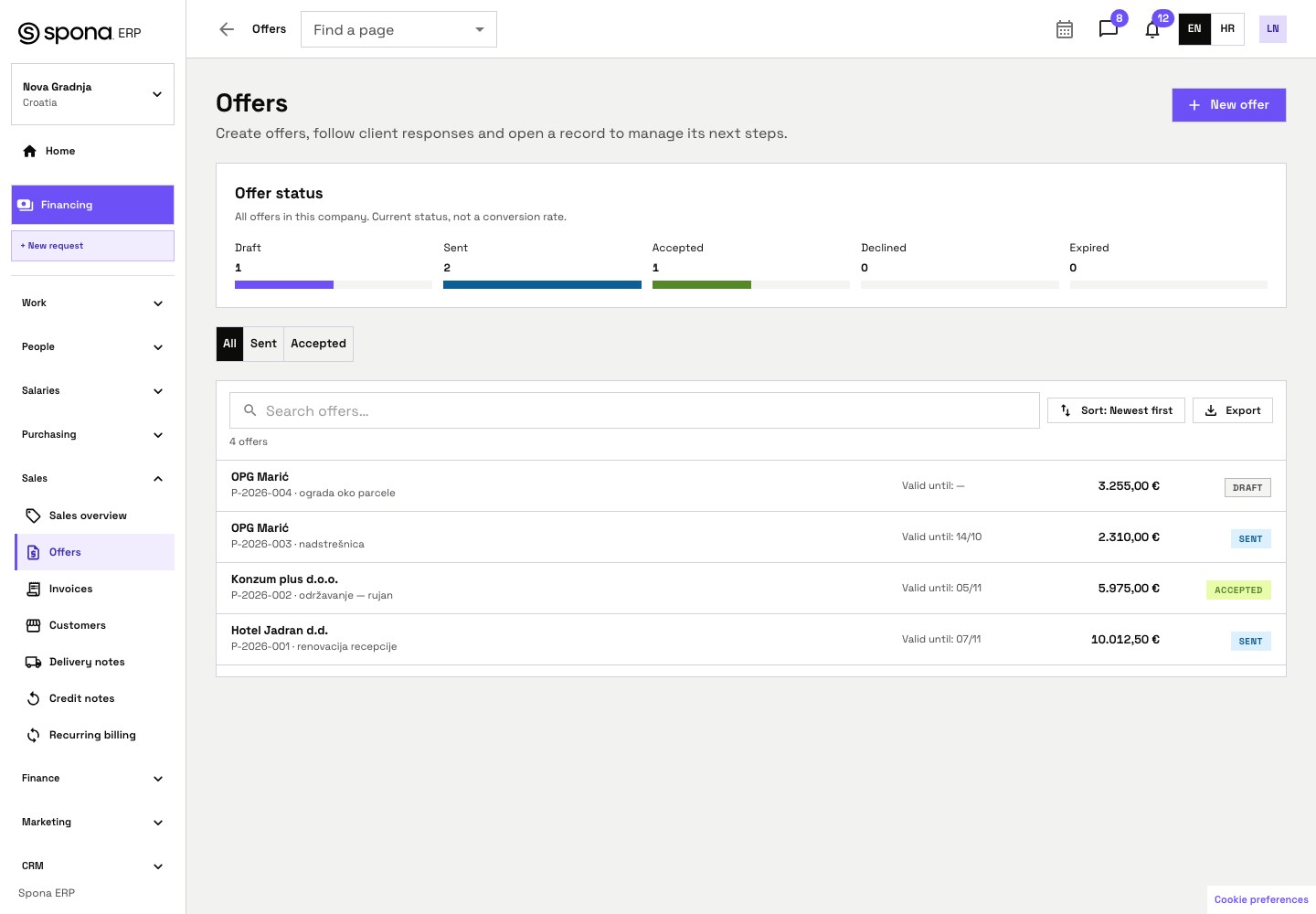 REAL APP · DEMONSTRATION DATAExplore the quote screen
Example quotes and their current statuses. The accepted P-2026-002 is part of this list.
Bring the work behind the invoice into view.
For staged services, use Work to organise scope, dates, tasks and delivery evidence. Request client confirmation for a completed stage. Keep the agreed terms and delivery records up to date in the relevant modules.
Explore Work →- 01Agree the stage
- 02Complete and document delivery
- 03Request client confirmation
- 04Explore financing where eligible